Time series
A time series tag is a float64 matrix stored in its own memory-mapped file. Rows are timestamps; columns are symbols (or any other string names). The source container caches indexes by start date. Tags with the same start date share an index; a tag created with a nonempty value= starts at that frame's earliest timestamp, so tags need not line up by row position.
Why these classes exist
A numeric history is often naturally a rectangle: time along one axis, named
channels along the other. Repeating a timestamp and identifier in every record
adds bookkeeping when the desired operation is a contiguous range of numbers.
TimeSeriesDisk stores one tag as a float64 matrix, with persisted column names;
TimeseriesContainer coordinates the tags and their time indexes. Applications
get a pandas view rather than rebuilding the entire history on every access.
The file is memory mapped so local processes can share resident pages. This avoids a full reload or server round-trip for each access, but does not make every pandas operation zero-copy: list selections and other gathers can allocate. The matrix layout serves aligned numeric histories; it is not a schemaless document store, an arbitrary irregular calendar, or a distributed transaction log.
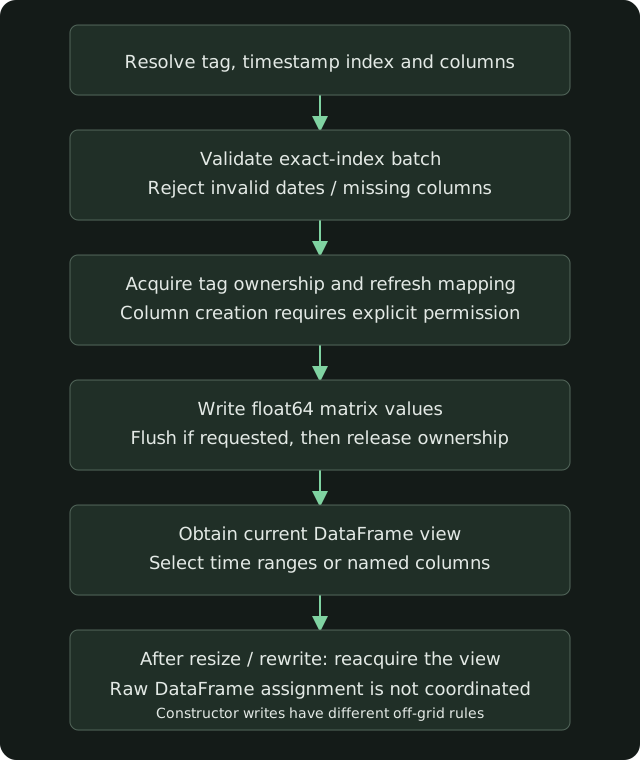
Positions refer to each tag's own persisted index. The default grid is weekday- based with defined time windows; it is not a universal calendar. Invalid or off-grid timestamps follow the different write-path rules below. Raw DataFrame assignment does not acquire the tag lock: use the coordinated write API and refresh views after structural changes.
When to choose time series
- A fixed numeric dtype and aligned timestamps across named columns.
- Range selections or bulk numeric updates rather than mixed-type keyed records.
- pandas/NumPy analysis that can reuse a mapped view between structural operations.
Use tables for mixed-field records and primary-key upserts. A matrix can reserve empty slots, so compare its shape with a sparse record representation before choosing storage. Measured API latency distinguishes slice selection, list gathering and batched writes; those are different workloads.
Class responsibilities
| Class | File | Role |
|---|---|---|
TimeseriesContainer |
src/SharedData/TimeseriesContainer.py |
One source: the time index, the tag map, head/tail read and write |
TimeSeriesDisk |
src/SharedData/TimeSeriesDisk.py |
One tag: the .bin matrix, the .meta columns, write_values |
SharedData.timeseries() is the constructor callers use. It checks the database, the period, and the source, then builds the container.
Address
{user}/{database}/{period}/{source}/timeseries/{tag}.bin
{user}/{database}/{period}/{source}/timeseries/{tag}.meta
source has no /. A tag has at most one /. The public method accepts period of D1, M15, or M1. (RT is a legal table period and a poor time-series period: the container does not build an RT index. W1 is implemented on the container and rejected by timeseries(), because it is not in PERIODS.)
The index runs from startDate to a January 1 boundary in the next year. Daily indexes include that boundary when it is a weekday; intraday indexes filter it out because it is midnight.
| Period | Default startDate |
Step |
|---|---|---|
| D1 | 1995-01-01 | weekdays at midnight |
| M15 | 2010-01-01 | 15 minutes, weekdays 07:00 inclusive to 22:00 exclusive |
| M1 | 2010-01-01 | 1 minute, weekdays 07:00 inclusive to 22:00 exclusive |
Pass startDate= on the first open to choose the container default. A later call on that cached container with a different startDate raises. An existing tag loads its persisted index; value= supplies the start date for a new tag. The container regenerates indexes and extends tags at the year rollover when load() runs.
Open a tag
from SharedData.SharedData import SharedData
import pandas as pd

shdata = SharedData(__file__, user='example')

# The container. load() maps every tag already on disk.
container = shdata.timeseries('TimeSeries', 'D1', 'DEMO')

# One tag. columns= creates the missing names. The return value is the
# DataFrame view (TimeSeriesDisk.data), not the TimeSeriesDisk.
view = shdata.timeseries(
    'TimeSeries', 'D1', 'DEMO', tag='close', columns=['EXAMPLE', 'SAMPLE'])
disk = container.tags['close']   # the TimeSeriesDisk
container[tag] is the same view. Do not keep view across a column append or a row extension: both remap the file, and the old DataFrame retains its original mapping. ensure_columns() returns a current DataFrame. write_values() refreshes the mapping and returns the number of rows written; obtain the current view from container[tag] after writing.
Write
Two write paths, with different rules for timestamps that are not on the index.
Constructor value= — skip and warn once
Handing a DataFrame to timeseries(..., tag=..., value=frame) writes the rows whose timestamps are slots of the index. A weekend or a date past the end of the index is skipped. One warning is logged for the whole frame (N of M rows ... were skipped). That is a batch log, not a log per row.
write_values / write_timeseries — exact match
TimeSeriesDisk.write_values(index, columns, values, add_columns=False, flush=False) requires every timestamp to be a stored slot and every column to exist. A missing timestamp raises ValueError. A missing column raises unless add_columns=True, which appends the column under the tag lock and then writes.
SharedData.write_timeseries(...) is that path for a DataFrame: it creates the tag when needed, adds columns, and rejects timestamps that are not on the index. flush=False makes the write visible in the shared mapping. It does not promise that the bytes are durable.
frame = pd.DataFrame(
    {'EXAMPLE': [1.10, 1.11]},
    index=pd.to_datetime(['2026-01-02', '2026-01-05']))
shdata.write_timeseries('TimeSeries', 'D1', 'DEMO', 'close', frame, flush=True)
Values are float64. Columns must be unique nonempty strings with no comma and no NUL. The exact-match write path rejects duplicate timestamps in one batch; the constructor value= path does not perform that duplicate check.
setValuesJit writes a non-contiguous batch without a Python loop over the cells. A dense block (consecutive rows and consecutive columns) is a slice assignment.
Grow the matrix
append_columns/ensure_columnsadds names.ensure_columnsreturns the current view.extend_rows/TimeseriesContainer.extend_all_tagslengthens the time index, for the year rollover.delete_columnsremoves names and rewrites the retained columns.
Each of those holds the tag mutex and rewrites the mapping. Quiesce any writer that assigns into the raw DataFrame before a resize. write_values coordinates with other write_values callers and with those structural operations. A raw view.loc[...] = ... does not take that lock.
Read and publish
TimeseriesContainer.read() and load() map the tags of the source. write() / write_head() / write_tail() publish a head and a tail the way tables do, including the S3 upload. acquire() / release() on the container cover the source; each tag has its own mutex on top of that.
get_loc_timestamp and get_loc_symbol are the index lookups. Prefer write_values over calling the JIT helpers yourself.
HTTP
GET / POST / PATCH / DELETE /api/timeseries/{database}/{period}/{source}/{tag} is the same container. PATCH /api/timeseries/{database}/{period}/{source}/write is the bulk exact-index write. GET and HEAD of a tag that does not exist answer 404. A POST answers appended_columns: the columns it added to an existing tag (none for a new tag). Paths and bodies are in the Swagger spec.
A producer or a backtest on the host that owns the files uses timeseries() and write_timeseries(). SharedData.dataframe('marketdata', ...) is the semantic API: it resolves a source and copies rows. It is the wrong call inside a write loop.