SharedData
SharedData is a memory-mapped store for records and time series — in the workload category of tick stores — plus the scheduler and worker pool that run the programs producing the data. Two containers do the storing: a table (row-oriented records with a primary key) and a time series (one float matrix per tag, with an index cached by start date). A dependency-aware scheduler and per-host workers do the orchestration; collections, cache and streams sit beside them.
Install the latest published package. The HTTP API is
described by the deployed server's OpenAPI document, served
at /apidocs.
Why two container types?
SharedData keeps typed data in files that local processes can map through the operating system's page cache. It exists to avoid repeatedly loading, copying and serializing the same working set between cooperating local processes. The data shape determines the container, rather than a particular industry:
| Shape and access pattern | Choose | Reason |
|---|---|---|
| Keyed records with mixed field types | Table | Update a record by key or append records without imposing a dense time grid |
| Aligned numeric values by time and named column | Time series | Keep a rectangular float matrix and expose pandas/NumPy views |
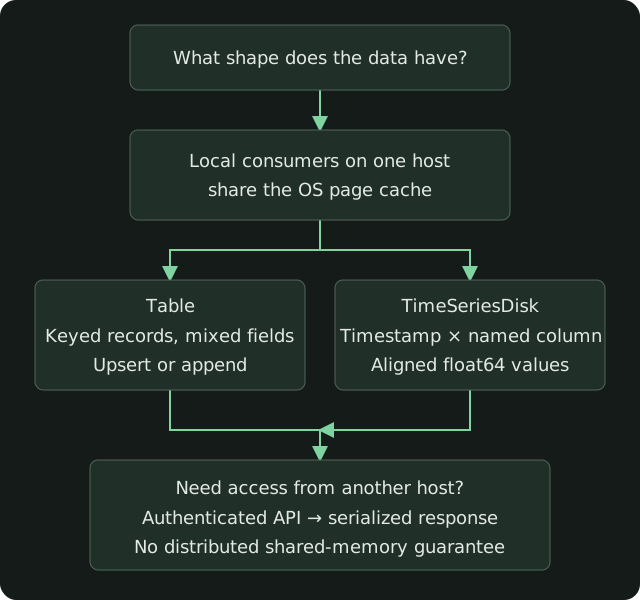
Shared pages are local to one host. Locking, image refresh, disk persistence and remote access are separate concerns; neither class promises distributed shared memory or a multi-record transaction. Read the synthetic latency results for measured API costs and limits, not a production SLA.
Reading map
| Page | What it is |
|---|---|
| Use cases | The workloads a production deployment runs, generalized |
| Orchestration | Routines, schedules, the worker pool and the Scheduler's tick |
| Table | Table, TableDisk, and the SharedNumpy object table() returns |
| Time series | TimeseriesContainer and TimeSeriesDisk |
| Logging templates | What the Scheduler logs, and what a routine must not log inside a loop |
| Swagger | Where the live spec is, and which paths it covers |
| Quick start | Install, environment, short examples |
| Configuration | Environment variables |
Address
A container is user / database / period / source / name.
databaseis a key ofDATABASE_PKEYSinsrc/SharedData/Database.py(MarketData,TimeSeries,Options, …).periodisD1,M15,M1, orRT.sourcehas no/. A table name or a tag has at most one/, and that slash is the partition (PRICES/2026).
from SharedData.SharedData import SharedData

shdata = SharedData(__file__, user='example')
records = shdata.table('MarketData', 'D1', 'DEMO', 'PRICES/2026')
frame = shdata.timeseries('TimeSeries', 'D1', 'DEMO', tag='close', columns=['EXAMPLE'])
table() returns the record array. timeseries(..., tag=...) returns the DataFrame view of that tag. The classes behind those calls are documented on the two core pages.
Client interfaces
Compatible clients can connect through the authenticated HTTP API or MCP. Data access and worker commands remain subject to the installation's permissions.
Project
Install the package, read the changelog, or see Building and publishing. All examples are illustrative.